
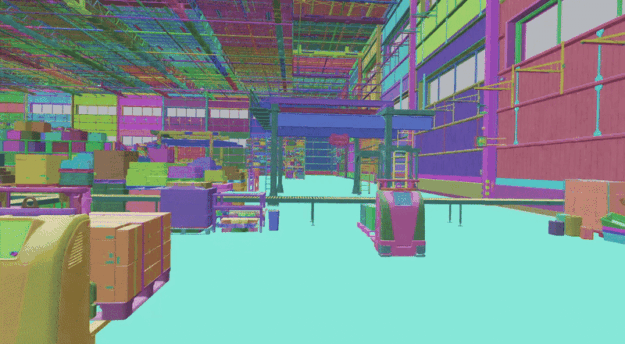
The "data wall" for physical AI just came crashing down. At GTC 2025, NVIDIA unveiled Cosmos, a suite of World Foundation Models (WFMs) designed to solve the single hardest problem in robotics: getting enough high-fidelity, physics-aware data to train autonomous systems without breaking them in the real world.
For builders, this isn't just another video generator. It is a physical reasoning engine.
Why this matters for builders
NVIDIA Cosmos is a suite of world foundation models that lets you generate high-fidelity, physics-aware synthetic training data for robots and autonomous vehicles using photorealistic video generation and multimodal reasoning.
Until now, training a humanoid or a self-driving car required either thousands of hours of risky real-world "frontier" data collection or clunky, low-fidelity simulations that didn't translate to reality (the "sim-to-real gap"). Cosmos changes the math. By using Cosmos Transfer, Predict, and Reason, builders can now generate edge-case scenarios—like a child running into a street or a robot handling a fragile glass—that are photorealistic and physically accurate.
"Cosmos introduces an open and fully customizable reasoning model for physical AI and unlocks opportunities for step-function advances in robotics and the physical industries." — NVIDIA Announcement
This unlocks a workflow where you don't just "code" a robot; you "simulate" its entire learning curriculum.
When to use it
NVIDIA Cosmos is specifically architected for "Physical AI"—systems that interact with the 3D world. You should reach for this toolset when:
- Training Humanoids/Robotics: You need diverse manipulation data (grasping, walking, climbing) that is too slow to collect in person.
- Autonomous Vehicle (AV) Safety: You need to test "long-tail" edge cases (extreme weather, rare accidents) that are too dangerous to film in reality.
- Synthetic Data Curation: You have massive amounts of unlabelled video and need an AI to "reason" through it and filter out the high-value frames.
- Digital Twin Alignment: You want your synthetic environments to align perfectly with real-world representations using spatiotemporal control maps.
The Full Process: Shipping Physical AI with Cosmos
To build with Cosmos, you aren't just writing Python; you are orchestrating a pipeline of physical "dreams" that the robot learns from. Here is the process for a builder using AI assistance (like Cursor or Windsurf) to integrate Cosmos.
1. Define the Physical Goal
Before touching a model, define the physics of the scene. Are you training a robot to sort laundry? You need to define the "world state."
- Identify the "Structural Inputs": Cosmos Transfer uses depth maps or edge maps.
- Define the "Outcome": What does a successful future state look like?
2. Shape the Physical Spec (Prompting)
When "vibe coding" with Cosmos, your prompts aren't just about aesthetics; they are about physical constraints. You aren't asking for "a cool video"; you are asking for "a 10-second sequence of a robotic arm applying 5 Newtons of pressure to a polycarbonate surface."
The Prompting Strategy: Use a "Physical Reasoning" framework:
- Context: The environment (e.g., a warehouse at 2 PM).
- Actor: The robot or vehicle.
- Physics: Lighting conditions, friction levels, or specific motion paths.
3. Scaffold with Cosmos Transfer
Cosmos Transfer is your "World Builder." It takes structural inputs (like a simple 3D block out or a depth map from a simulator) and turns it into photorealistic video.
Builder Workflow:
- Generate a low-fi simulation in a tool like NVIDIA Isaac Sim.
- Pass the depth/spatiotemporal maps to Cosmos Transfer.
- The model generates a video that preserves the pretrained knowledge of the real world while aligning with your specific structural layout.
4. Implement Future Prediction with Cosmos Predict
If you want your robot to "think" before it acts, you use Cosmos Predict. This model generates "future world states."
Validation Step: Prompt the model: "Given this current frame of a robot reaching for a cup, predict the next 2 seconds of physics if the cup is made of porcelain vs. foam." If the AI predicts the porcelain cup shattering or the foam cup compressing accurately, your training data is high-quality.
5. Validate and Filter with Cosmos Reason
This is where vibe coding meets rigorous engineering. You will likely generate 100x more data than you need. Cosmos Reason acts as the "curator." It perceives the synthetic video and evaluates it.
Example Logic for your AI Assistant: "Write a script to pass the generated Cosmos videos through the Cosmos Reason API. Filter for clips where the reasoning engine confirms: 'The object remains within the robot's grip throughout the entire duration' and 'Lighting remains consistent with the specified environment parameters.'"
6. Ship and Close the Loop
The final step is feeding this refined, high-fidelity data into your robot's neural network (the policy). Because the data is "physics-aware," the transition from the Cosmos-generated world to the real world is significantly smoother.
Copy-paste Prompt Templates
Use these as starter templates for your AI coding assistant when defining your Cosmos pipeline.
For Cosmos Reason (Data Selection)
Role: Physical AI Data Curator
Task: Evaluate the following synthetic video sequence for physical accuracy.
Criteria:
1. Does the robot arm follow a continuous spatiotemporal path?
2. Are the shadows and reflections consistent with a single light source?
3. In the event of a collision, does the object react according to [Material Type: e.g., Metal]?
Action: Return a 'Valid/Invalid' score and a reasoning string for the training dataset log.
For Cosmos Predict (Edge Case Generation)
Task: Generate a future-state sequence.
Initial State: [Upload Image/Depth Map of a car at an intersection]
Variable: A pedestrian enters the crosswalk from the blind spot at 5mph.
Requirement: Generate 48 frames of future state showing the vehicle's LIDAR-based trajectory and physical braking response under [Condition: e.g., Wet Asphalt].
Pitfalls and Guardrails
What if the synthetic data looks "too good" but the physics are wrong?
This is the most dangerous pitfall in Physical AI. A video can look photorealistic while violating the laws of gravity. This is why Cosmos Reason is mandatory. Never use Cosmos Transfer outputs for training without a "Physical Validation" pass using Cosmos Reason or a hard-coded physics engine check.
Does this replace traditional simulators like Isaac Sim?
No. Think of Cosmos as the "rendering and reasoning" layer that sits on top. Use traditional simulators for the structural logic (the "skeleton") and Cosmos to provide the "flesh"—the high-fidelity textures, lighting, and complex physical interactions that basic simulators struggle to render accurately.
What is the "Sim-to-Real" safety check?
Before shipping a model trained on Cosmos data to a real humanoid, run a "Shadow Test." Feed real-world video into Cosmos Predict and see if the model's prediction of what should happen matches what actually happens in the real world. If the error rate is high, your synthetic data needs better spatiotemporal control maps.
What to do next
- Audit your data needs: Identify the "edge cases" where your current robot or AV fails most often.
- Access the Models: Check the NVIDIA Cosmos page for API availability or container downloads.
- Start with "Reason": Use Cosmos Reason to curate your existing real-world datasets first to get a feel for the model’s physical logic.
- Adopt the "Predict" Workflow: Instead of hard-coding every reaction, start training your models to predict the next 10 frames of their environment using Cosmos Predict.
Sources
- Scale Synthetic Data and Physical AI Reasoning with NVIDIA Cosmos World Foundation Models | NVIDIA Technical Blog
- NVIDIA Announces Major Release of Cosmos World Foundation Models and Physical AI Data Tools | NVIDIA Newsroom
- Physical AI with World Foundation Models | NVIDIA Cosmos
- Curating Synthetic Datasets to Train Physical AI Models with NVIDIA Cosmos Reason | NVIDIA Technical Blog