
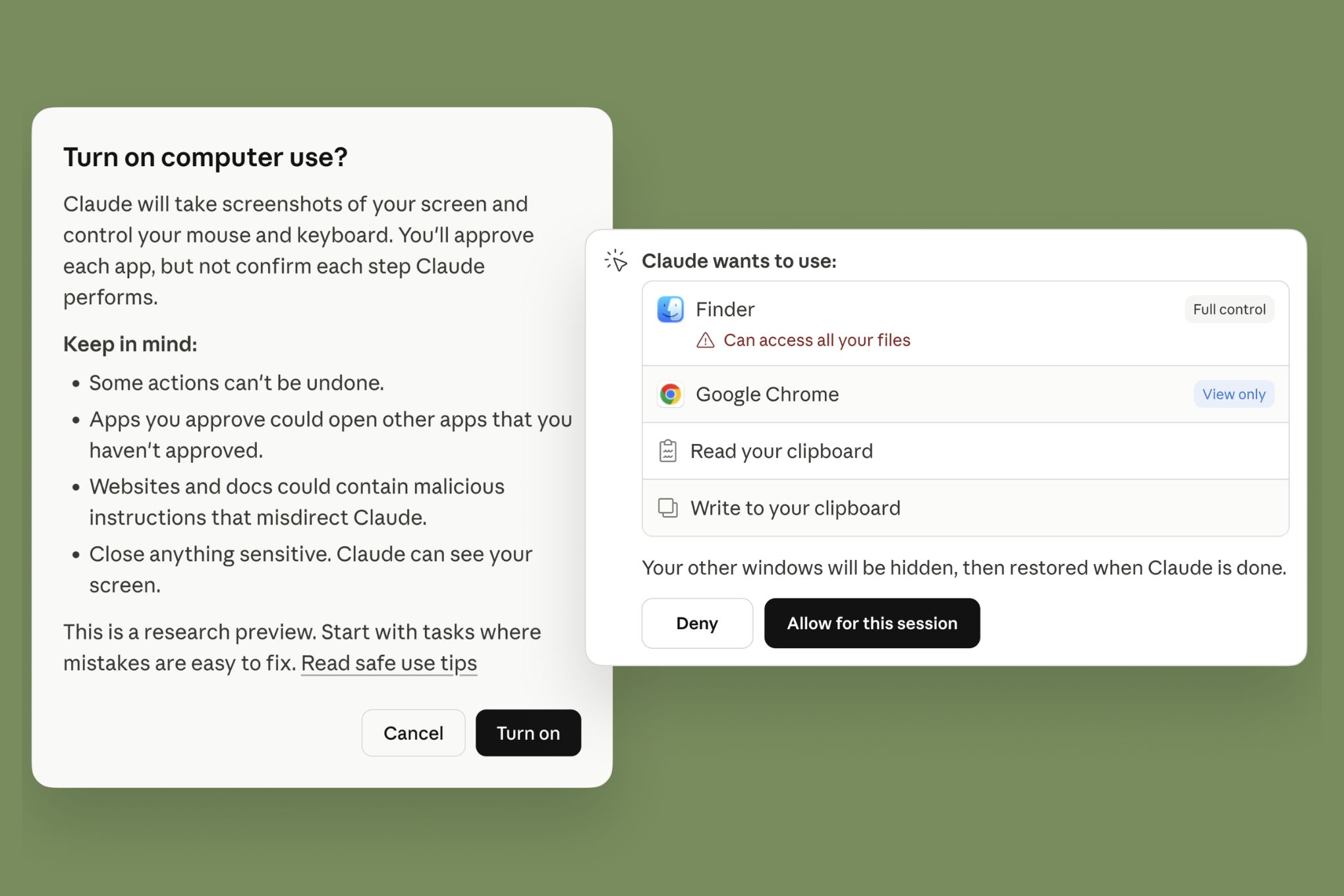
The barrier between "writing code" and "operating a computer" has officially dissolved. With the launch of computer control for Claude Code and Claude Cowork, Anthropic has transitioned Claude from a chatbot that suggests code to an agent that can execute it, test it, and deploy it by literally driving your Mac.
For vibe coders and product-minded builders, this isn't just a new feature; it’s a shift in the manufacturing process of software. You are no longer the manual labor moving files—you are the site foreman.
Why this matters for builders
Claude’s computer control lets you automate end-to-end development workflows by allowing the AI to autonomously navigate your macOS environment, interact with local files, run terminal commands, and use web browsers.
Until now, "vibe coding" involved a high volume of copy-pasting: you’d grab a prompt, get code, paste it into VS Code, see an error, and paste the error back. Anthropic’s update removes this friction. By prioritizing service connectors (like Slack and Google Workspace) and falling back to direct control of your mouse and keyboard, Claude can now "sit at your desk" to finish a task while you’re away or focused on higher-level logic.
When to use it
This feature is a research preview optimized for complex, multi-step tasks that require context from multiple apps.
- Legacy Code Migration: When you need Claude to open an old project, identify dependencies, and update them one by one across dozens of files.
- End-to-End Testing: When you want Claude to spin up a local server, open Chrome, navigate to
localhost:3000, and verify that a new UI component actually works. - Documentation-to-Code: Point Claude at a technical spec in your browser or a PDF, and have it implement the logic directly in your IDE.
- Remote Tasking via "Dispatch": When you’re away from your desk and need to assign a bug fix or a file retrieval task from your phone to your Mac.
- Cross-App Workflows: Pulling data from a spreadsheet, updating a React component with that data, and then posting a summary in a Slack channel.
The full process: From "Vibe" to "Shipped"
Phase 1: Define the Scope and Permissions
Before you let Claude take the wheel, you must set the boundaries. Because this feature uses your actual mouse and keyboard, it will prompt you for explicit permission before it starts exploring or clicking.
- Subscription Check: Ensure you have a Claude Pro or Max subscription.
- Hardware Check: This is currently limited to macOS devices.
- Setup: Install the Claude desktop app and pair it with the Claude mobile app if you plan to use the "Dispatch" feature for remote work.
- Security Prep: Close any sensitive windows (banking, private DMs) before starting, as Claude will be taking screenshots of your display to "see" what it’s doing.
Phase 2: Shaping the Spec via "Dispatch"
One of the most powerful workflows involves using the Dispatch feature. You don’t even need to be at your computer to start the build.
- The Prompt Strategy: Don’t be vague. Give Claude a "Definition of Done."
- Example Prompt: "Open the 'PikaNews' project folder. Find the navigation component, change the background to #F4F4F4, run
npm run dev, and open Chrome to verify the change. If it looks correct, commit the change with the message 'UI tweak'."
Phase 3: Scaffolding and Exploration
Once you grant permission, Claude begins its autonomous loop.
- Connectors First: Claude will first try to use direct APIs (connectors) for services like Slack or Google Workspace to save time.
- Visual Navigation: If no API is available, Claude will take screenshots, analyze the UI elements, and begin moving the cursor. You will see the mouse move and apps open in real-time.
Phase 4: Implementation and "Second Tries"
Anthropic notes that complex tasks sometimes need a second try. Unlike pure code generation, computer control is "slower than using a direct integration" because it has to wait for UI elements to load.
- Validation Step: If Claude gets stuck, it may ask for a hint or a second permission window.
- Monitoring: Watch the progress via the Claude mobile app if you are away from your desk. You can see the logs of what the agent is doing in real-time.
Phase 5: Validate and Ship
Never assume the agent's first pass is perfect.
- Review the Screenshots: Claude provides a trail of what it saw and did.
- Run the Build: Manually trigger your test suite or check the browser one last time.
- Commit: Once satisfied, you can have Claude handle the Git flow or do it yourself to maintain control of the main branch.
Copy-paste prompts for builders
For Local Environment Setup
"Claude, open my terminal and check if I have the latest version of Node.js installed. If not, use Homebrew to update it. Then, navigate to my desktop and create a new Next.js project named 'vibe-check-app' using the default settings."
For Cross-App Data Sync
"Open the 'Project_Specs.docx' file in my Downloads folder. Read the requirements for the new 'Contact Us' form. Then, open VS Code, find the
Contact.tsxcomponent, and update the form fields to match the document. Once done, send a message to the #dev-updates Slack channel saying the form is ready for review."
For Debugging
"Open my browser to
localhost:3000. Open the developer console and look for any Redux errors. If you find one, find the corresponding action file in my IDE and suggest a fix."
Pitfalls and guardrails
What if Claude gets stuck in a loop or clicks the wrong thing?
Anthropic’s safety architecture requires explicit permission for interactions. If the agent is misinterpreting a UI element, cancel the task, move the window to a more visible area of the screen, or simplify the task into smaller sub-tasks. Computer control is slower than code generation—patience is required.
Is my data safe if Claude is "watching" my screen?
Claude takes screenshots to understand the state of your computer. While Anthropic emphasizes privacy, you should treat a computer control session like a screen-share with a colleague. Close private tabs and sensitive documents before initializing the session.
Why is it slower than just using the API?
Directly controlling a browser or IDE via "vision" and "clicks" involves significant latency compared to a direct API call. Use connectors for supported services (Slack, Google Workspace) whenever possible to speed up the process.
Can I use this on Windows or Linux?
Not yet. The research preview is strictly limited to macOS for the time being.
What to do next
- Download the Claude Desktop App: Ensure you are on the latest version to see the "Computer Use" or "Cowork" options.
- Run a "Hello World" Agent Task: Ask Claude to create a text file on your desktop and write a joke in it to test the permissions.
- Set up Dispatch: Link your mobile app so you can start assigning tasks to your Mac while you're getting coffee or commuting.
- Audit your Connectors: Enable the Slack and Google Workspace integrations in Claude’s settings to give the agent a "fast lane" for those apps.