
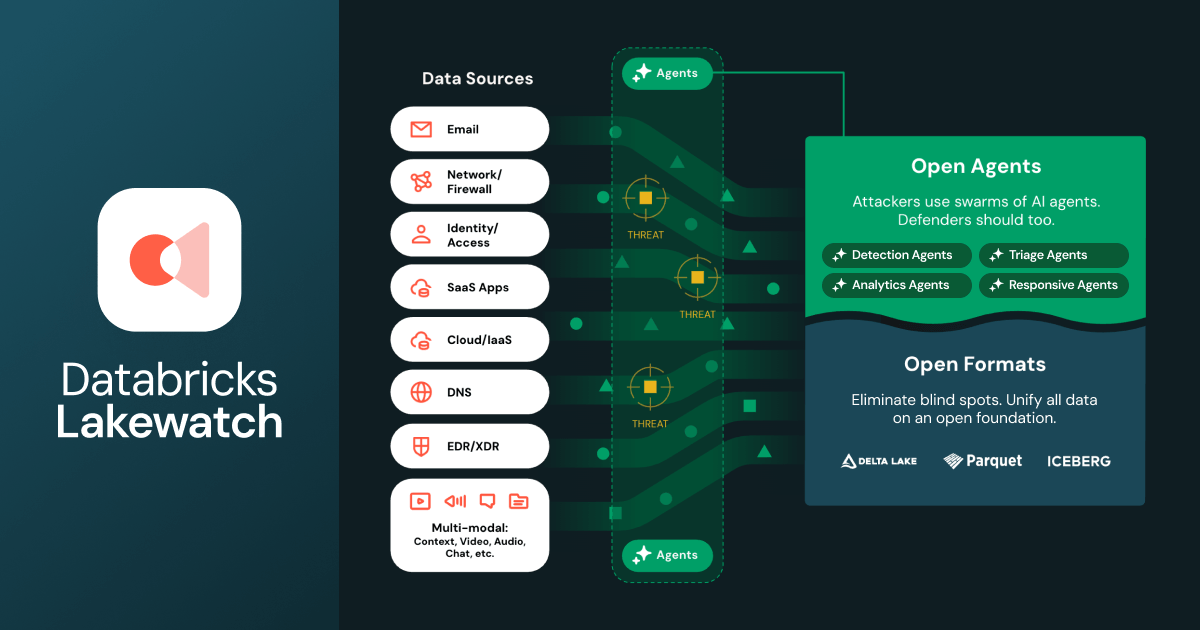
In the world of security operations, we are moving past the era of "static dashboards" and entering the era of "autonomous response." Legacy SIEM (Security Information and Event Management) tools have long been the "tax" builders pay to store logs they rarely search. Databricks just flipped the script with the announcement of Lakewatch.
This guide is for builders who want to stop managing infrastructure and start building defensive agents.
Why this matters for builders
Lakewatch is an open, agentic SIEM that unifies security, IT, and business data into a single, governed environment for AI-driven detection and response.
For years, the "Security Data Lake" was a DIY project involving complex pipelines and brittle integrations. Lakewatch changes this by making the Lakehouse the native home for security. It unlocks three major shifts:
- From Rules to Agents: Instead of writing thousands of fragile YARA or Sigma rules, you deploy defensive AI agents that can triage, hunt, and respond to "agentic" attackers—AI-powered threats that move faster than human analysts.
- Open Architecture: By using open formats (like Delta Lake), Lakewatch eliminates the "data hostage" situation typical of legacy SIEM providers. You own your data; you don't pay a premium just to access it.
- Multi-modal Visibility: It doesn't just ingest logs; it ingests multi-modal data (text, telemetry, business context) at a scale that allows for full-enterprise visibility without the traditional cost-prohibitive licensing.
When to use it
Lakewatch isn't just another logging tool; it’s an automation platform. Use it when:
- You are hitting "License Walls": If your current SIEM bill is spiking because of data volume, Lakewatch’s open data architecture is designed to slash those costs.
- You need autonomous triage: If your SOC (Security Operations Center) is drowning in false positives that require human context to solve.
- You are defending AI workloads: If you need to monitor for sophisticated AI-driven attacks that bypass traditional signature-based detection.
- You want vendor independence: If you need to retain and analyze years of data without being locked into a proprietary vendor's ecosystem.
The full process
Since Lakewatch is currently in Private Preview, your goal today is to architect your data environment so that you are "Lakewatch-ready." Here is the builder’s workflow for implementing an agentic security posture.
1. Define the Security Data Lakehouse
The foundation of an agentic SIEM is unified data. You cannot have an agent "hunt" for threats if your identity data is in one silo and your cloud logs are in another.
- Action: Map your data sources. Unlike legacy SIEMs, Lakewatch thrives on multi-modal data.
- The Vibe: Use an AI coding assistant to generate a schema mapping for your disparate logs (AWS CloudTrail, Okta, GitHub, CrowdStrike) into a unified Delta Lake format.
2. Shape the "Agentic" Spec
In a traditional SIEM, you define a "Detection." In Lakewatch, you define a "Mission" for an agent. You need to move from "If X happens, alert me" to "If X happens, investigate Y, check Z, and summarize the risk."
- Goal: Define the triage logic for your first defensive agent.
- Validation: Ensure your spec includes "human-in-the-loop" checkpoints. Even agentic SIEMs need a builder to verify high-stakes responses.
3. Scaffold Multi-modal Ingestion
Lakewatch enables the ingestion of "unprecedented volumes" of data. To prepare, build your ingestion pipelines using open formats.
- Technical Focus: Focus on high-throughput ingestion. Use tools like Spark or Delta Live Tables (DLT) to move data into your Databricks environment.
- Checklist:
- Are logs being converted to Parquet/Delta?
- Is Unity Catalog enabled for governance?
- Are business context tables (employee lists, asset tags) accessible to the security workspace?
4. Implement AI Detection and Response Agents
Once your data is unified, you deploy the "Agentic" layer. While the specific Lakewatch Agent SDK is in preview, the concept relies on LLMs having access to your Lakehouse tools.
- Automation: Create "Hunter Agents" that run on a schedule to look for anomalies in multi-modal data that traditional rules would miss.
- Tooling: Use the Databricks AI functions to allow your agents to query your security tables directly using natural language.
5. Validate and Ship
Before letting agents take action, you must validate their logic against historical "true positive" attacks.
- The "Shadow" Phase: Run your Lakewatch agents in "Shadow Mode" where they generate responses and triage notes without actually blocking users or shutting down instances.
- Feedback Loop: Use the performance data from Adobe and Dropbox (the early adopters) as a benchmark: focus on "Time to Triage" as your primary metric.
Copy-paste prompts for preparation
While waiting for your Private Preview access, you can use these prompts with your AI coding tools (Cursor, GitHub Copilot, etc.) to prepare your data structures for an agentic SIEM.
Prompt: Architecting a Unified Security Schema
"I am preparing to move to Databricks Lakewatch. I have raw logs from AWS, Okta, and SentinelOne in JSON format. Generate a PySpark script that flattens these logs, maps them to a unified schema (timestamp, actor, action, resource, risk_score), and writes them to a Delta Lake table partitioned by date. Ensure the schema supports multi-modal metadata fields for future AI agent analysis."
Prompt: Designing a Triage Agent Mission
"Act as a security engineer. I want to build a defensive agent mission for an agentic SIEM. Define the logical steps for an agent when it detects 'Impossible Travel' in Okta logs. The agent should:
- Query the last 30 days of login activity for that user.
- Check the user's current project status in our Jira/Business data.
- Cross-reference the IP address against known threat intelligence.
- Summarize the findings in a Slack alert with a 'Recommend Action' button."
Pitfalls and guardrails
What if the agent hallucinates a threat?
This is the biggest fear in "agentic" security. Guardrail: Never give an agent "Auto-Admin" privileges on day one. Use Lakewatch to generate the triage and remediation plan, but keep the "Execute" button behind a human approval gate in Unity Catalog.
How do I control costs with "unprecedented volumes" of data?
Vibe coders often forget that "storage is cheap, compute is not." Guardrail: Use Delta Lake’s lifecycle policies to tier your data. Keep "hot" data (last 30 days) on high-performance compute for active agents, and move "cold" data (compliance logs) to low-cost storage where it can still be queried by agents if an investigation requires it.
Is my data locked in again?
The announcement emphasizes "open formats." Guardrail: Verify that all data ingested into Lakewatch remains in Delta Lake or Parquet. This ensures that if you ever need to move, you can point any other Spark-compatible engine at your S3/ADLS bucket and walk away.
What to do next
- Request Access: Head to the Databricks site to sign up for the Lakewatch Private Preview.
- Audit Your Storage: Identify where you are currently paying "vendor tax" for security logs and calculate the potential savings of moving that data to a Lakehouse.
- Consolidate Identity: Ensure your identity provider data is accessible within your Databricks environment; agents are only as good as their understanding of "who is doing what."
- Follow the Leaders: Keep an eye on technical blogs from Adobe and Dropbox to see how they are structuring their agentic workflows within Lakewatch.