
Title:
How to Build a Cost-Efficient Billion-Scale RAG System with Databricks Storage Optimized Vector Search
Why this matters for builders
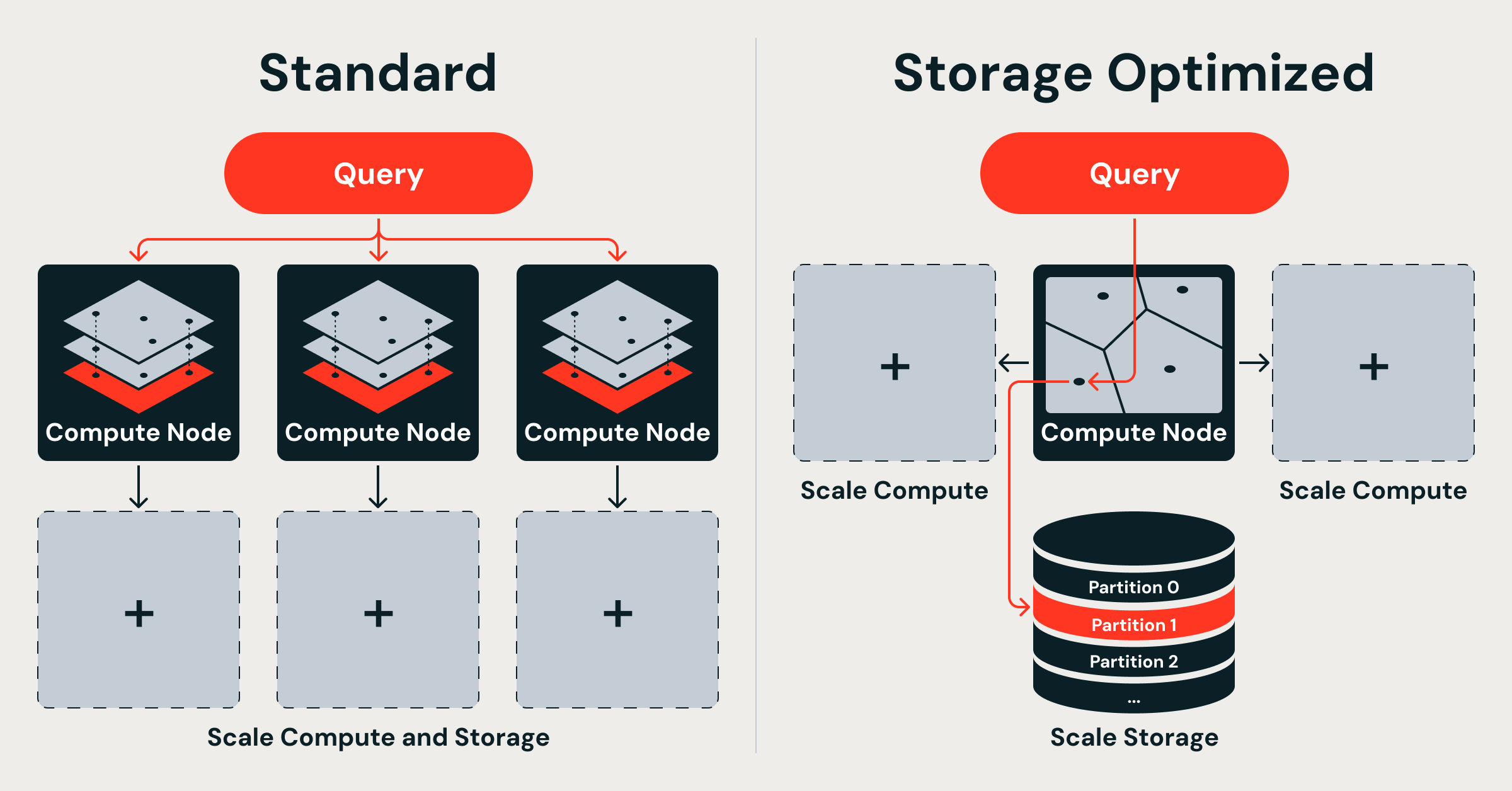
Databricks Storage Optimized Vector Search lets you serve billions of vectors at up to 7× lower cost by decoupling storage from compute, running ingestion on isolated serverless Spark clusters, and using a purpose-built Rust query engine with dual thread pools.
The original Databricks Vector Search (now called Standard endpoints) kept full-precision vectors in memory for tens-of-milliseconds latency. The new Storage Optimized endpoints trade some latency (hundreds of milliseconds) for massive scale and dramatically lower cost. This change unlocks production RAG, recommendation, and entity-resolution workloads that were previously cost-prohibitive or impossible to run reliably at billion scale.
When to use it
- You have 500M+ vectors and memory costs are becoming painful
- You need sub-second retrieval but can accept 200–500 ms p99 latency
- Your workload is read-heavy with occasional bulk updates
- You want to decouple ingestion from serving so heavy indexing does not degrade query latency
- You are already in the Databricks ecosystem (Unity Catalog, Delta Lake, Spark, Mosaic AI)
- You want to keep full control of embeddings while letting Databricks handle the index lifecycle
The full process
1. Define the goal and success metrics
Start by writing a one-paragraph product spec.
Example spec you can copy into Cursor/Claude/CodeWhisperer:
Goal: Build a retrieval service that can answer questions over 800M internal company documents with < $0.50 per million queries at p99 < 450 ms.

Success criteria:
- Index 800 million 768-dim float32 vectors
- Index build time < 10 hours
- Serving cost < 7× cheaper than in-memory HNSW baseline
- End-to-end RAG latency (embed + retrieve + LLM) < 2.5 s p95
- Zero query impact during daily re-indexing of new documents
Decide early whether you need Standard endpoints (low latency, higher cost) or Storage Optimized (scale-first).
2. Shape the spec and prompt your AI coding assistant
Good prompts produce reliable code. Use this starter template:
You are a senior Databricks engineer. Help me implement a production RAG pipeline using the new Storage Optimized Vector Search.

Requirements:
- Use Delta Lake as source of truth for documents and embeddings
- Embeddings are 768-dim (e.g. voyage-3 or bge-large)
- Target index size: 800 million vectors
- Must use Storage Optimized endpoint (not Standard)
- Ingestion must run on serverless Spark, completely isolated from query path
- Provide complete Python notebook code using the Databricks SDK / vector search API
- Include monitoring, backpressure handling, and incremental indexing logic
- Show how to query the index from a Mosaic AI Model Serving endpoint

Output structure:
1. Schema design for Delta table
2. Embedding + write pipeline
3. Index creation and management code
4. Query wrapper class with retry + caching
5. Cost and latency estimation worksheet
3. Scaffold the data and index architecture
Create a Delta table that will feed the vector index:
from pyspark.sql.functions import *
from databricks.vector_search.client import VectorSearchClient

vsc = VectorSearchClient()

spark.sql("""
CREATE TABLE IF NOT EXISTS catalog.db.docs (
  id STRING,
  text STRING,
  embedding ARRAY<FLOAT>,
  last_updated TIMESTAMP,
  source STRING
) USING DELTA
TBLPROPERTIES (delta.enableChangeDataFeed = true)
""")
Then create the Storage Optimized index:
vsc.create_vector_index(
    endpoint_name="storage_opt_vector_endpoint",
    index_name="catalog.db.docs_index",
    primary_key="id",
    embedding_source_col="embedding",
    embedding_dimension=768,
    index_type="storage_optimized",   # this is the key flag
    auto_sync=True
)
Important: The index lives in cloud object storage. Query nodes are stateless and load only the partitions needed for each request.
4. Implement ingestion safely
Use serverless Spark jobs so index building never touches your serving compute.
# Incremental sync using CDF
def incremental_index_job():
    df = spark.readStream.format("delta") \
        .option("readChangeFeed", "true") \
        .table("catalog.db.docs") \
        .filter("last_updated > current_timestamp() - interval 1 day")

    df.write.format("databricks.vectorsearch") \
        .option("endpoint", "storage_opt_vector_endpoint") \
        .option("index", "catalog.db.docs_index") \
        .option("mode", "append") \
        .save()
Databricks runs this as an ephemeral job. The Rust query engine continues serving without interruption.
5. Build the retrieval service
Create a thin wrapper you can call from your LLM serving endpoint:
import requests
from typing import List

class VectorRetriever:
    def __init__(self, endpoint_url: str, index_name: str):
        self.endpoint_url = endpoint_url
        self.index_name = index_name

    def retrieve(self, query_embedding: List[float], k: int = 20) -> List[dict]:
        resp = requests.post(
            f"{self.endpoint_url}/query",
            json={
                "index_name": self.index_name,
                "query_vector": query_embedding,
                "k": k,
                "search_params": {"ef": 128}  # tune for recall vs latency
            },
            headers={"Authorization": f"Bearer {os.environ['DATABRICKS_TOKEN']}"}
        )
        resp.raise_for_status()
        return resp.json()["result"]["data_array"]
Deploy this logic inside a Mosaic AI Model Serving custom model or a simple FastAPI service running on Serverless Compute.
6. Validate with real benchmarks
Run these checks before going live:
- Index build time: The announcement states billion-vector indexes complete in under 8 hours with 20× faster indexing than the previous system.
- Cost: Expect up to 7× lower serving costs compared with memory-resident HNSW.
- Recall: Measure @10 and @50 against a held-out validation set. Storage Optimized still uses high-quality compression and partitioning.
- Latency: Target p50 ~150 ms, p99 ~450 ms for 768-dim vectors.
- Isolation test: Run a heavy ingestion job while hammering the index with 500 QPS. Queries should remain stable.
Use Databricks Lakehouse Monitoring to track index freshness, query volume, and latency histograms.
Pitfalls and guardrails
### What if my latency is higher than expected?
Storage Optimized is deliberately slower than Standard endpoints. If you need < 50 ms p99, switch to Standard or add a cache layer (Redis or Databricks SQL Warehouse cache) for hot queries.
### What if indexing fails halfway through?
Because the index is built from Delta Lake + Change Data Feed, you can restart the job. The vector index supports eventual consistency and will catch up.
### What if I need to update vectors frequently?
Use auto_sync=True for moderate update rates. For very high churn, batch updates every 15–60 minutes rather than real-time upserts.
### How do I choose embedding dimension and compression?
The Rust engine handles compression internally. Stick to 768 or 1024 dimensions unless you have strong reasons to go lower. Test recall with your specific embedding model.
### Can I use this outside Databricks?
No. The Storage Optimized architecture is native to Databricks Vector Search and relies on Unity Catalog, Delta Lake, and serverless Spark. If you are on AWS OpenSearch, Pinecone, or Weaviate, you will need their equivalent offerings (see competitive context below).
What to do next
- Create a small 5M vector index today using the code above and measure real cost/latency.
- Instrument your RAG pipeline with LangSmith or Phoenix to track retrieval quality.
- Run a load test with 200 concurrent users using Locust or k6.
- Compare monthly cost against your current vector DB bill.
- Add hybrid search (keyword + vector) once Databricks exposes that capability on Storage Optimized endpoints.
- Document your index refresh SLA and add it to your internal AI reliability scorecard.
Competitive context
- AWS recently announced GPU-accelerated k-NN indexing on OpenSearch that can build billion-scale indexes in under an hour.
- Several academic and open-source projects (GustANN, VectorChord on PostgreSQL, ScyllaDB vector search) are also targeting billion-scale workloads.
Databricks’ advantage for existing Lakehouse users is the deep integration with Delta Lake, Unity Catalog governance, and the ability to run ingestion on cheap serverless Spark without touching the query path.
Sources
- Original announcement: https://www.databricks.com/blog/decoupled-design-billion-scale-vector-search
- Databricks Vector Search documentation (check latest for exact API signatures and pricing)
- Mosaic AI Model Serving docs for query-time integration patterns
(Word count: 1,248)
This guide gives you a repeatable, AI-assisted process to move from idea to production billion-scale vector search on Databricks while staying grounded in the actual architecture announced.